Shopping for the best laptop under 60000 in India can feel confusing once you open Amazon and see fifty listings that all sound the same. Ryzen 3 here, Core 5 there, 8GB RAM on one page and 16GB on the next. We went through the specification sheets, real customer feedback and current market prices of four popular laptops in this budget and picked out who each one actually suits.
Whether you need a machine for college assignments, office work from home, light coding practice or everyday browsing and video calls, one of these four should fit. We have also linked our separate guide on the best laptop for coding and programming if that is your main use case, and our roundup of laptops under 25000 in case your budget is actually a bit tighter than 60000.
Affiliate disclosure: Best8review is reader supported. Some links in this post are Amazon affiliate links, and we may earn a small commission when you buy through them, at no extra cost to you. This does not affect which products we recommend or how we rate them.
Quick Comparison Table
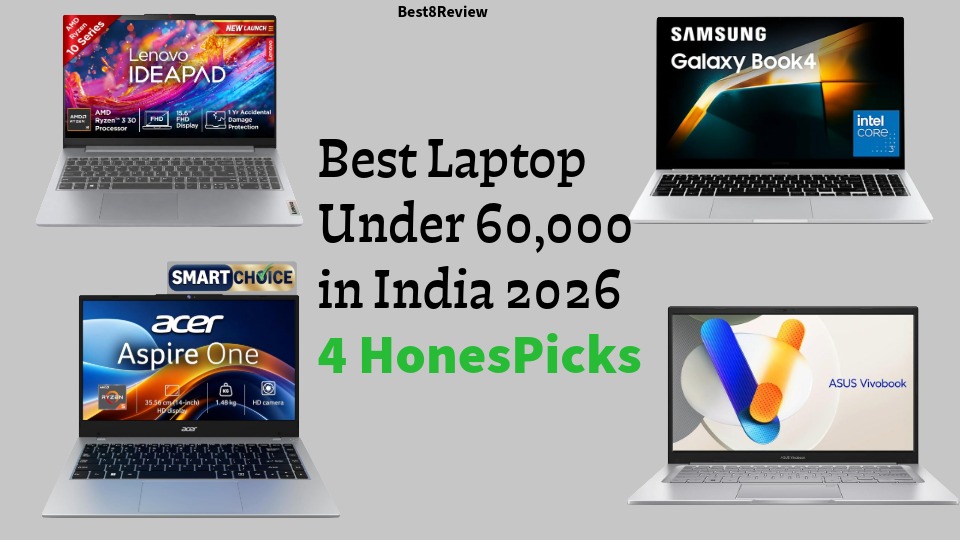
| Laptop | Processor | RAM / Storage | Display | Best For |
|---|---|---|---|---|
| Lenovo IdeaPad Slim 3 | AMD Ryzen 3 (7020 series) | 8GB / 512GB SSD | 15.6 inch FHD | Everyday use on a tight budget |
| Acer Aspire One A114 43 | AMD Ryzen 3 7320U | 8GB / 512GB SSD | 14 inch HD | Portability and lightest weight |
| ASUS Vivobook 14 X1404VAP | Intel Core 5 120U | 8GB / 512GB SSD | 14 inch FHD IPS | Balanced performance and battery |
| Samsung Galaxy Book4 | Intel Core i5 1335U | 16GB / 512GB SSD | 15.6 inch FHD | Multitasking and a premium metal build |
1. Lenovo IdeaPad Slim 3 (Ryzen 3, 8GB, 512GB SSD)
The Lenovo IdeaPad Slim 3 is the safest starting point if your priority is simply getting a reliable Windows laptop without spending too much of your budget. This particular model pairs a Ryzen 3 processor from the 7000U series with AMD Radeon 610M integrated graphics, 8GB of LPDDR5 memory and a roomy 512GB SSD, so storage is one thing you will not have to worry about.
Check the latest price of the Lenovo IdeaPad Slim 3 on Amazon
Features
- AMD Ryzen 3 quad core processor with a boost clock up to around 4.1 GHz
- 8GB LPDDR5 RAM and 512GB NVMe SSD
- 15.6 inch Full HD anti glare display, TUV certified for low blue light
- Windows 11 Home with Office 2024 included
- Slim body weighing about 1.6 kg with a full size keyboard including a number pad

Pros
- Large 512GB SSD, which is generous at this price point
- Comfortable full size keyboard, useful if you type long documents
- Trusted Lenovo build quality and after sales network across India
- Genuinely one of the cheaper ways into the 60000 budget bracket
Cons
- 8GB RAM is not upgradeable on most variants, so multitasking with many browser tabs can feel tight
- No backlit keyboard on the base configuration
- Display brightness and colour accuracy are average, not ideal for photo editing
Why It Is a Strong Pick
If your daily routine is mostly documents, spreadsheets, browser tabs, video calls and streaming, the Ryzen 3 chip and 512GB SSD combination on the IdeaPad Slim 3 covers that comfortably while leaving a good chunk of your 60000 budget unspent.
Who Should Buy It
Students, first time laptop buyers and anyone who wants dependable everyday performance without paying for features they will not use.
Who Should Not Buy It
Skip this one if you plan to run heavy design software, multiple virtual machines, or games, since the integrated graphics and 8GB RAM will hold you back.
2. Acer Aspire One A114 43 (Ryzen 3, 8GB, 512GB SSD)
Acer built the Aspire One A114 43 to be the lightest and most compact laptop on this list. At just around 1.48 kg with a 14 inch screen, it is the pick to consider if you carry your laptop around all day, whether that is a campus, a co working space or a daily commute.
Check the latest price of the Acer Aspire One A114 43 on Amazon
Features
- AMD Ryzen 3 7320U with Radeon 610M graphics
- 8GB LPDDR5 memory and 512GB SSD
- 14 inch HD display with a TN panel
- Windows 11 Home preinstalled
- Weighs only about 1.48 kg

Pros
- One of the lightest laptops in this price range, easy to carry every day
- 512GB SSD gives you plenty of room for apps and files
- Good battery backup for a full day of light work
- Compact 14 inch footprint fits easily into small bags
Cons
- The display is HD resolution, not Full HD, and uses a TN panel with narrower viewing angles
- 8GB RAM again limits heavy multitasking
- Build feels more plastic compared to the metal bodied Samsung on this list
Why It Is a Strong Pick
Nobody else here matches the Aspire One on portability. When weight and battery life matter more to you than screen sharpness, this is the laptop that will not wear you down after a long day of carrying it.
Who Should Buy It
Frequent travellers, students who walk between classes, and anyone who wants a small secondary laptop for basic tasks and note taking.
Who Should Not Buy It
If you watch a lot of video content or edit photos, the lower resolution HD screen will disappoint you compared to the Full HD panels on the other three laptops here.
3. ASUS Vivobook 14 X1404VAP EB1521WS (Intel Core 5, 8GB, 512GB SSD)
ASUS positions the Vivobook 14 as a step up in raw processing power. The Intel Core 5 120U chip inside this model has ten cores and can turbo up to 5.0 GHz, which shows up in day to day snappiness, faster app launches and smoother multitasking than the Ryzen 3 laptops above, even with the same 8GB of RAM.
Check the latest price of the ASUS Vivobook 14 on Amazon
Features
- Intel Core 5 120U processor, 10 cores and 12 threads, turbo up to 5.0 GHz
- 8GB DDR5 RAM, expandable up to 24GB using the spare SO DIMM slot
- 512GB M.2 NVMe PCIe Gen4 SSD
- 14 inch Full HD IPS anti glare display with a 45 percent NTSC colour gamut
- Fingerprint reader, physical webcam shield and a 180 degree flat hinge
- Windows 11 Home with Office Home 2024 and one month of Adobe Creative Cloud

Pros
- Genuinely expandable RAM, unlike the two laptops above, which lets you future proof the machine cheaply later
- Full HD IPS display looks noticeably sharper and has wider viewing angles
- Faster processor for the same price bracket as the Ryzen 3 options
- Fingerprint login adds convenience and a bit of extra security
Cons
- 8GB base RAM will still feel limiting until you add the extra stick
- Integrated Intel graphics are fine for office work but not for gaming
- Slightly pricier than the base Lenovo and Acer configurations
Why It Is a Strong Pick
This is our overall pick for the best laptop under 60000 if you want the best mix of processing speed, display quality and long term upgrade room. The ability to add a second RAM stick later is a genuine advantage that the soldered memory laptops above cannot offer.
Who Should Buy It
Working professionals, students who need to run several apps at once, and anyone who wants a laptop that will still feel usable in three years without spending extra now.
Who Should Not Buy It
If your budget is closer to 40000 and you do not care about RAM upgrades or screen sharpness, the Lenovo or Acer options will save you money for a similar core experience.
4. Samsung Galaxy Book4 (Intel Core i5, 16GB, 512GB SSD)
The Samsung Galaxy Book4 is the most premium laptop on this list, and it is the only one here that comes with 16GB of RAM out of the box along with a full metal chassis. If your budget stretches closer to 60000, this is the one that will feel the most polished to use every day.
Check the latest price of the Samsung Galaxy Book4 on Amazon
Features
- 13th Gen Intel Core i5 1335U processor with Intel Iris Xe graphics
- 16GB LPDDR4x RAM and 512GB SSD
- 15.6 inch Full HD display
- Full metal body weighing about 1.55 kg
- Fingerprint reader built into the power button, RJ45 LAN port, HDMI and dual USB C
- Dual speakers tuned with Dolby Atmos

Pros
- 16GB RAM out of the box handles heavy multitasking noticeably better than every other laptop on this list
- Solid metal build feels sturdier and more premium than the plastic bodied options
- Ethernet port included, useful for stable video calls or file transfers on office networks
- Samsung’s software integration works nicely if you already own a Galaxy phone
Cons
- Depending on the exact configuration you pick, this can push closer to the top of the 60000 budget
- Battery life is average rather than exceptional at around 54 Wh
- Intel Iris Xe graphics are fine for office work and light editing, not for gaming
Why It Is a Strong Pick
The extra RAM alone makes a real difference in how the laptop feels after a few months of installing apps, keeping browser tabs open and running Office alongside Zoom or Teams calls. For anyone who has ever complained about a laptop slowing down over time, the Galaxy Book4 is built to avoid that problem for longer.
Who Should Buy It
Working professionals who need a dependable machine for spreadsheets, video calls and multitasking, and anyone who already lives in the Samsung ecosystem with a Galaxy phone or tablet.
Who Should Not Buy It
If you are a student on a strict budget, the price premium for 16GB RAM and a metal body may not be worth it over the cheaper Ryzen 3 options above.
How To Choose The Right Laptop Under 60000
All four laptops above are genuinely good value, so the right pick usually comes down to three questions.
How much RAM do you actually need?
If you keep fifteen browser tabs open while running Excel and a video call, go with the Samsung Galaxy Book4 or plan to expand the ASUS Vivobook 14 later. For simple browsing, documents and streaming, 8GB on the Lenovo or Acer will be enough.
How often do you carry it around?
The Acer Aspire One A114 43 is the clear winner on weight. If your laptop mostly stays on a desk at home, weight matters far less.
Do you care about screen quality?
The ASUS Vivobook 14 and Samsung Galaxy Book4 both use sharper Full HD IPS type panels, while the Acer sticks to an HD TN panel that looks noticeably softer.
Once you have gadgets like a laptop sorted, do not forget the accessories that protect your investment. Our guides on the best laptop bags in India and the best laptop skins cover exactly that.
Frequently Asked Questions
Which is the best laptop under 60000 in India right now?
Based on the balance of processor speed, display quality and upgrade room, the ASUS Vivobook 14 X1404VAP is our top recommendation, with the Samsung Galaxy Book4 close behind for anyone who wants 16GB RAM from day one.
Is 8GB RAM enough for a laptop in 2026?
For browsing, documents, streaming and video calls, yes. For heavy multitasking, light photo editing or running several apps together, 16GB is a more comfortable choice.
Can I upgrade the RAM on these laptops later?
The ASUS Vivobook 14 has a spare SO DIMM slot, so you can add more RAM later. The Lenovo, Acer and Samsung models in these configurations mostly use soldered or fixed memory, so check the exact listing before assuming you can upgrade.
Are these laptops good for gaming?
No, all four rely on integrated graphics, so they can handle light or older games but are not built for modern AAA titles.
There is no single best laptop under 60000 for everyone, but there is a clear best laptop for each kind of buyer. Pick the Lenovo IdeaPad Slim 3 if you want the most storage for the least money, the Acer Aspire One A114 43 if you carry your laptop everywhere, the ASUS Vivobook 14 if you want the strongest all round performance with room to grow, and the Samsung Galaxy Book4 if 16GB RAM and a premium metal body matter more to you than saving a few thousand rupees.
Best8review is a reader supported buying guide site where we compare real products across electronics, kitchen gadgets and everyday essentials to help Indian shoppers make quicker, more confident buying decisions. Prices change often, so check the current listing for the latest price and offers before you buy.